
Consumer mobile app, 2026
FriendshipHub: real conversations with verified people
A social app where people talk to verified creators over voice, video and chat, send gifts and join live streams, with a creator side built around fair, transparent earnings.
- Role
- Product designer, design and front end
- Platforms
- iOS, Android, web prototype, marketing site
- Year
- 2026
- Scope
- Consumer app, creator tools, wallet, rewards
- 113Screens in the native app inventory
- 11Funnels mapped end to end
- 2Sides: users and creators
Step 1
Research and define
Find out what is broken and what people need, then write the problem down in one place.
Understand the problem
People want real conversations with real people, and creators need a safe, fair way to earn from them. Both depend on trust: that people are who they say they are, that calls are private, and that money is handled clearly.
I studied the product from three angles before drawing anything new.
- A full UX audit. Every user and creator screen was reviewed on 19 June 2026 and produced 11 findings: 3 critical, 3 high, 4 medium and 1 low. The critical ones were dead actions on the main discovery feed, a raw browser alert on Messages and inactive safety and share buttons on creator profiles.
- Funnel mapping. I mapped 11 funnels, from first open to activation, first call, first deposit, repeat spend, gifting, going live, creator payouts, referral and churn signals, so each one has a measurable point where people drop.
- Feedback from the teams who run it. The analytics plan went through four versions as the user acquisition and CRM teams asked for changes. One ask was to warn people early when their coin balance runs low, which added low-balance prompts on the home screen.
Problem statement
Who: people who want a real conversation with someone verified, and the creators who are paid for their time.
Pain: users cannot always tell who is real or what a call will cost, and a topped-up wallet can still run dry mid-call. Creators lack a short, clear path from sign-up to a first payout.
Why fix it: trust and price clarity decide whether someone makes a first call and comes back to recharge, and a smooth creator path decides whether there is anyone worth calling.
Design principles
- Trust comes first. Verified creators, encrypted calls and clear safety tools in every flow.
- Pricing is never a surprise. Coin costs are visible before a call starts.
- Recharge without breaking the moment. Topping up during a call never ends the call.
- Keep people coming back. Rewards, a leaderboard and live events give a reason to return.
Step 2
Ideate and wireframe
Turn the problem into structure: which screens exist, how people move between them, and where the money flows.
Mapping the flows
The whole app as flows in plain boxes: no colour, no type, only what leads to what, drawn from the app's real routes. The map covers getting in, the core call loop, money and rewards, the creator path and the safety path. Dashed boxes are moments that must never interrupt what the person is doing.
Structure decisions
The audit and the funnels raised structural questions that the map made visible.
- Two surfaces for browsing. Home and Discover looked alike. Home stays the place to find and call a creator, and Discover stays the full-screen reels feed.
- Wallet is revenue-critical but sat deep in the app. It opens from the wallet button in the home header, and recharge is also available inside a call.
- Onboarding had too many steps. Photo can be skipped and the creator path asks for one choice at a time: call type, then verification.
- Safety needs somewhere to go. Blocked users, support tickets, a help centre and clear banned or suspended screens with an appeal form are part of the structure, not an afterthought.
Step 3
Design and prototype
Give the structure a look and a feel, then build it as a working prototype so it can be tried on a phone.
Discovery and calls
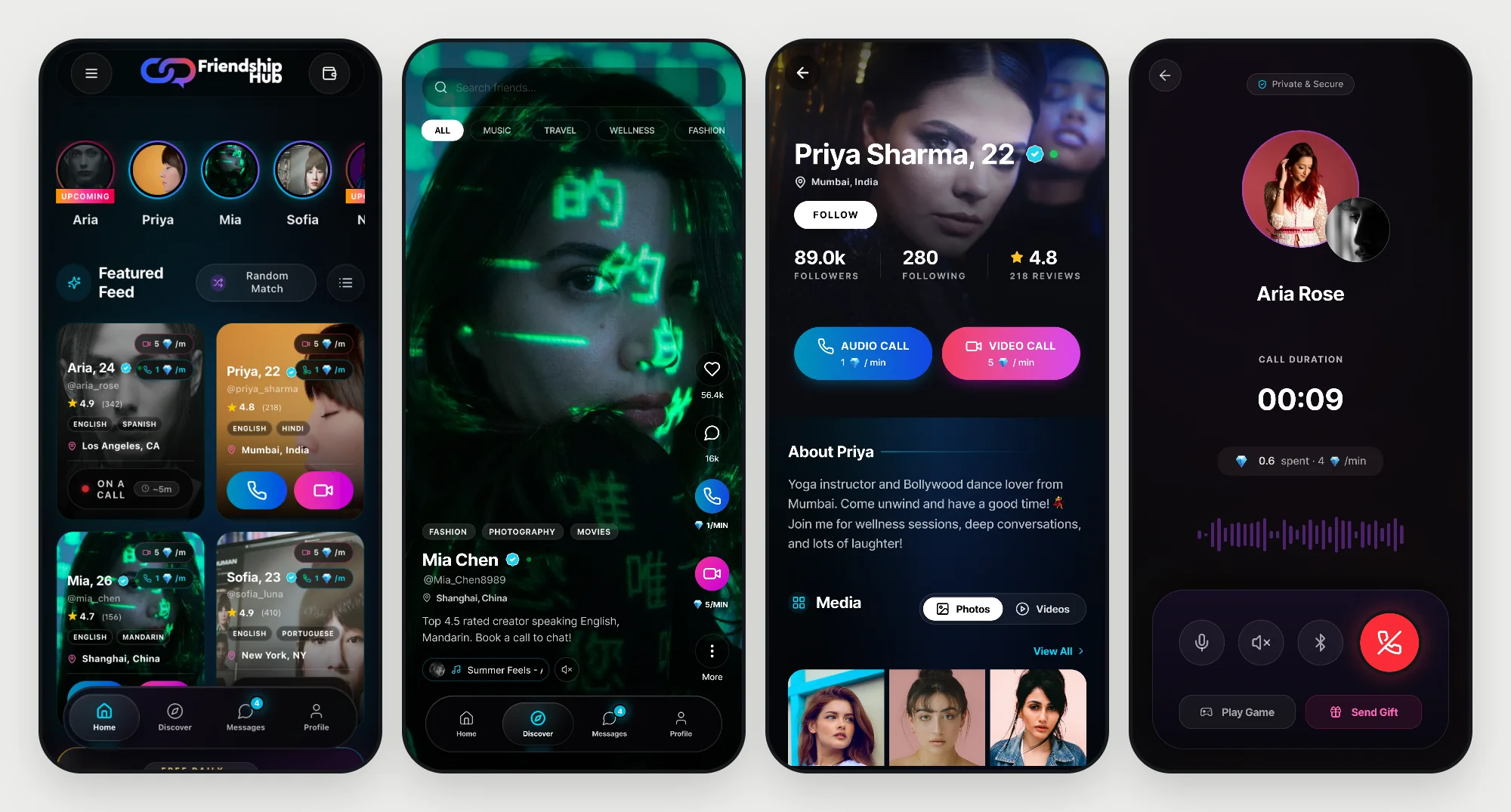
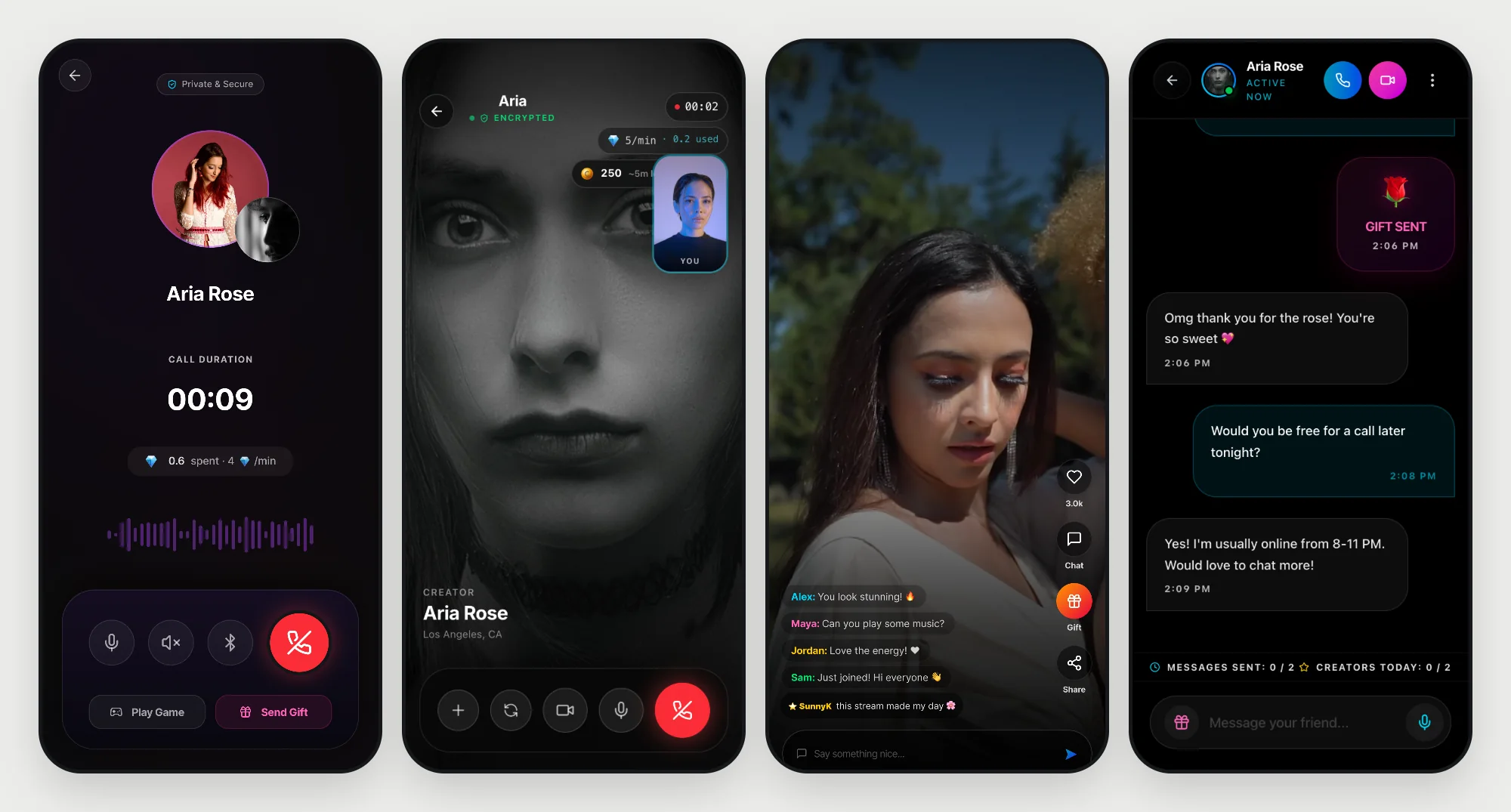
A feed of creators with a call button on every card, then a profile with the facts that build trust: a verified badge, followers, rating and review count, and audio and video call buttons that state the price per minute before anyone taps. Below come the creator's story, a photo and video gallery and voice signatures. The call screen keeps one clear job: it shows who you are talking to, how long it has been, what it has cost so far and the rate per minute, with mute, speaker, Bluetooth, gifts and games within reach and a private and secure badge at the top. Discover is a full-screen reels feed with a search bar, category chips and a side rail where the call and video buttons show their rate per minute. Live streams add a chat overlay, gifts and sharing. The discover, creator profile, call and live screens are shown here from the Figma designs.
Wallet, gifts and rewards
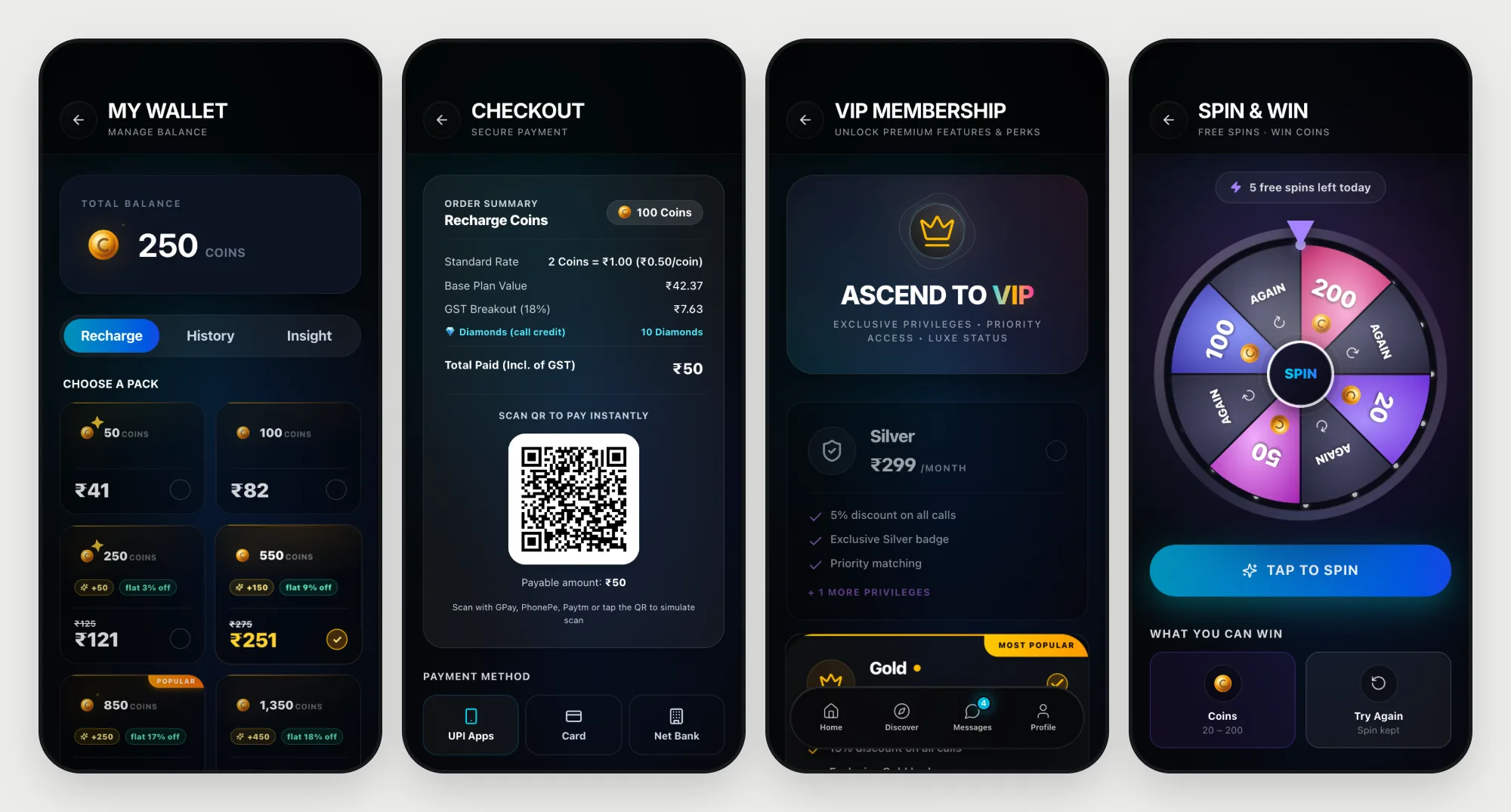
- A wallet with coin packs, history and insight, and checkout by UPI, card or net banking
- VIP tiers with their perks laid out side by side
- Coin-to-diamond conversion, with diamonds as the currency creators are paid in
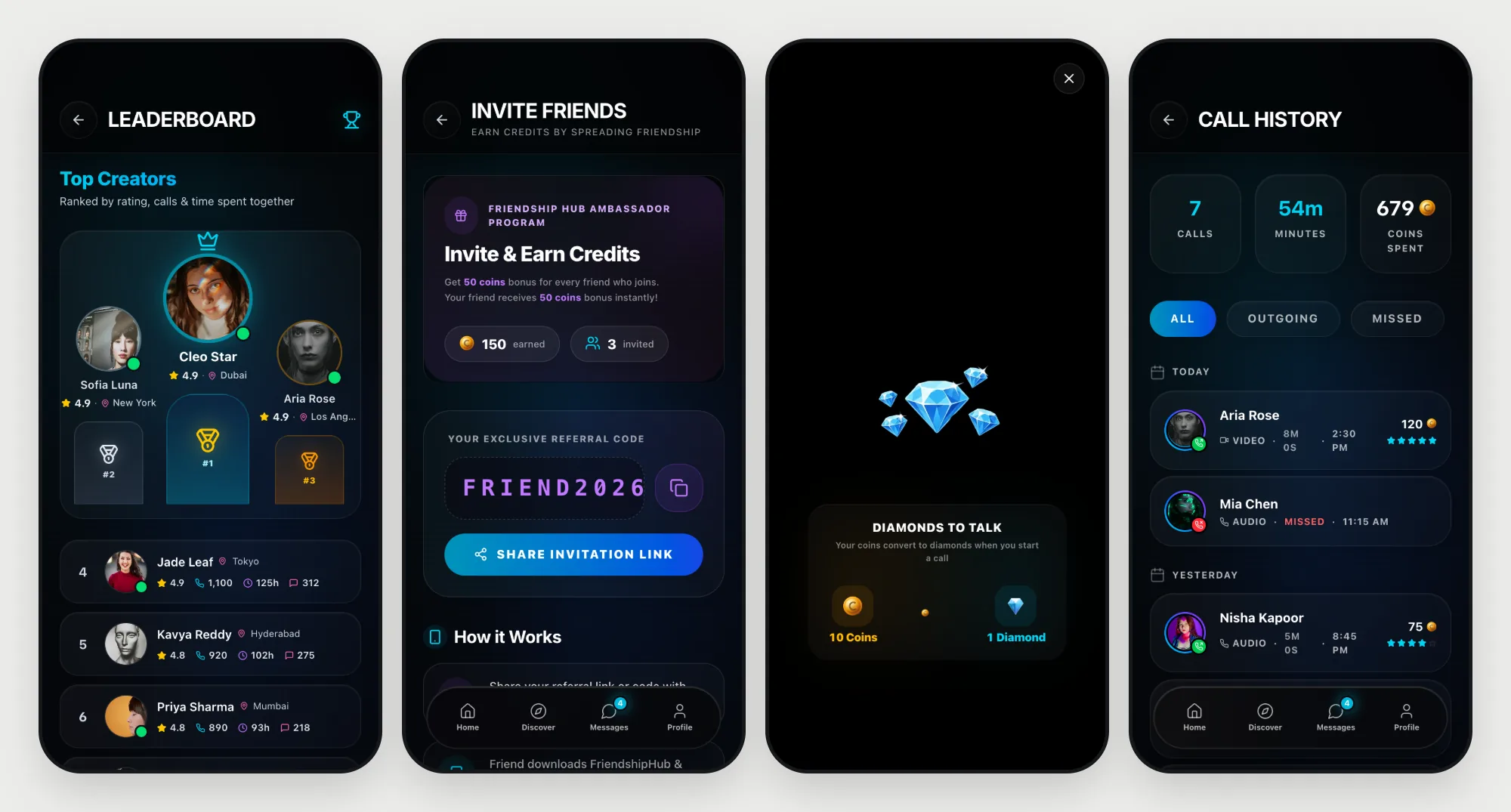
- Daily rewards, Spin and Win, referrals and a leaderboard
The creator experience
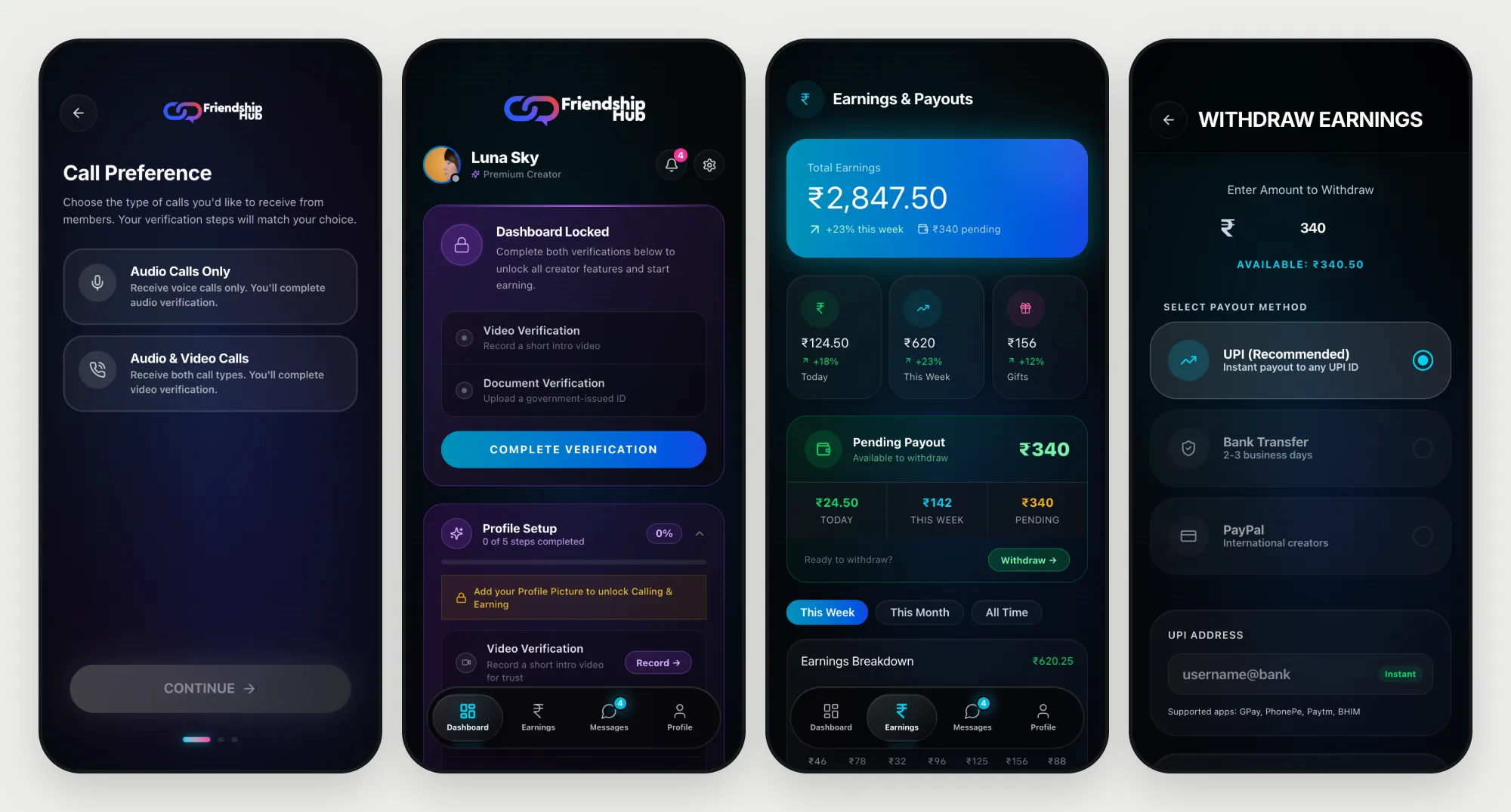
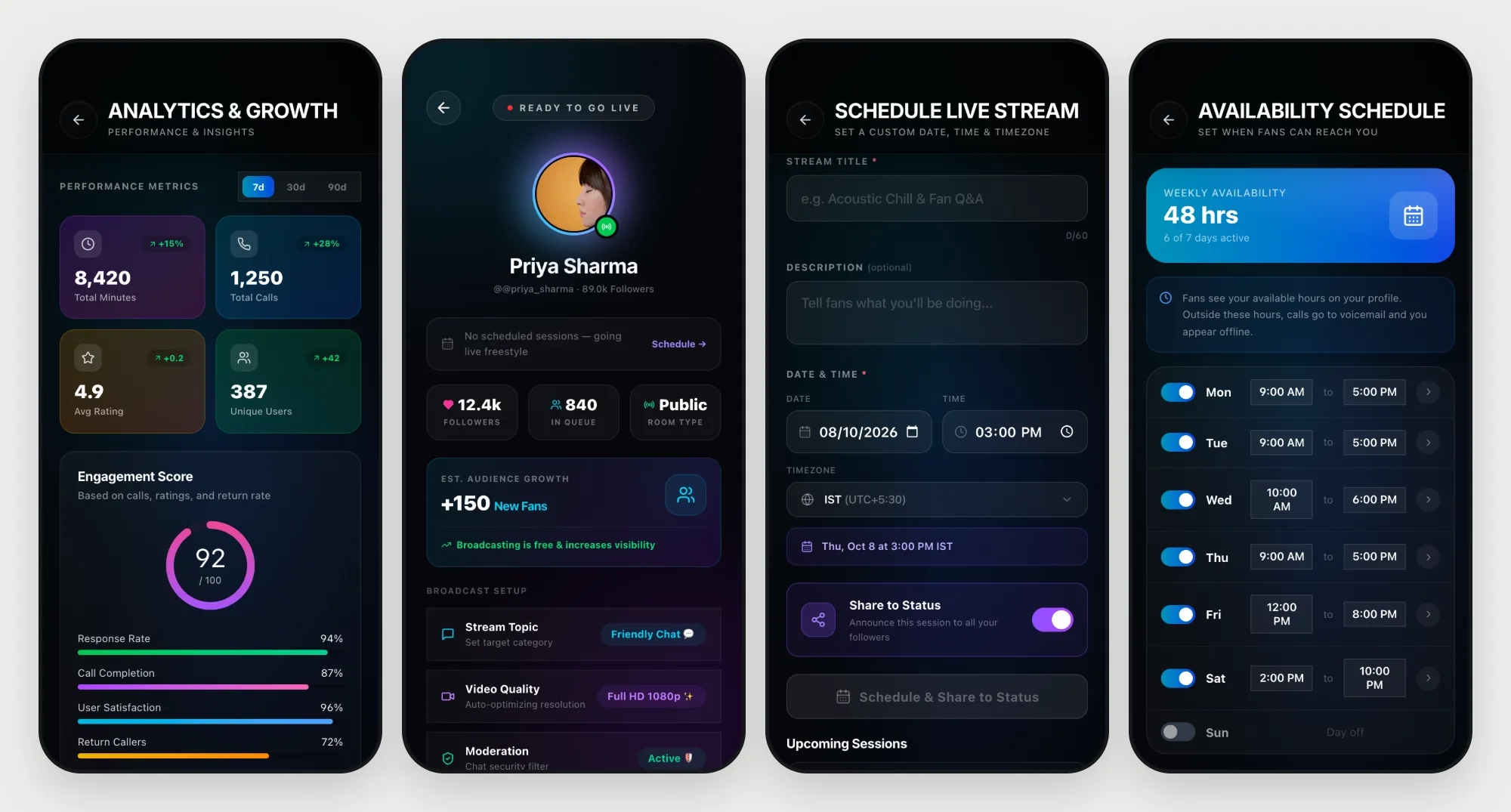
Creators choose what kind of calls they want to take, then verify with a short video and an ID. Until they do, the dashboard stays locked and says exactly what is missing. After that it shows earnings, pending payouts, analytics, availability and going live, with withdrawal by UPI, bank transfer or PayPal for international creators.
Trust and safety
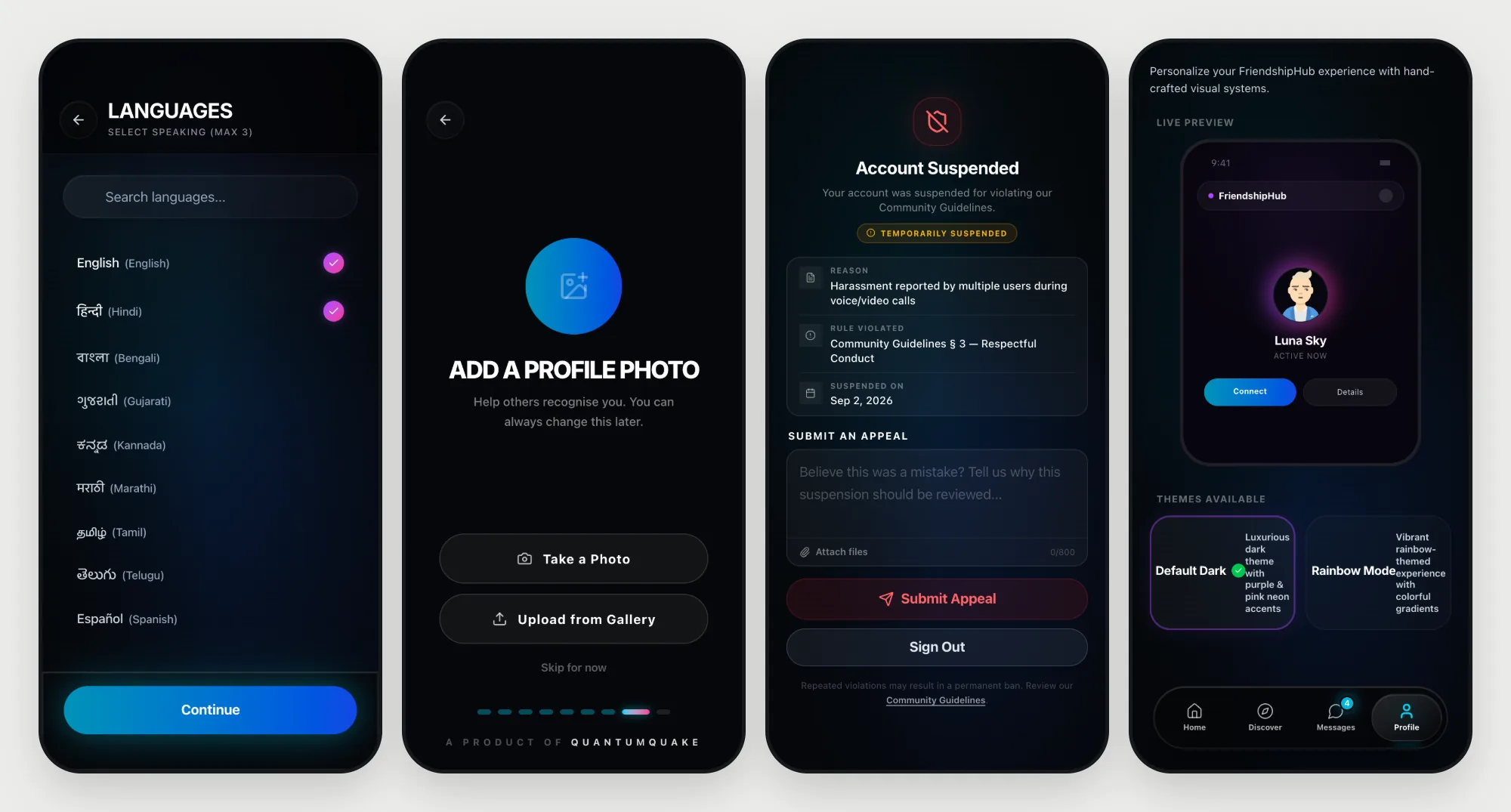
Language and photo are chosen early, and a community guidelines screen must be accepted before anything else. If an account is suspended, the person sees the reason, the date and a form to appeal, rather than a dead end. An appearance screen lets people choose the default dark theme or a rainbow theme.
Design system and tokens
The look is a dark, glassy style called Luxe Cyber-Glass: neon purple, pink and cyan on near-black surfaces, with smooth, spring-based motion that stays calm rather than gamey. It is built in three layers so a change in one place reaches every screen.
- Primitives. The raw values: six colours, greys, six radii, a 4px-based spacing scale, a seven-step type scale in Inter and four weights.
- Semantic tokens. What a value is for: page and surface backgrounds, four levels of text, brand and status colours, and which radius belongs to cards, buttons, pills and inputs.
- Component tokens. Buttons, cards and inputs read the semantic layer. Cards use the 20px radius and a faint white border, buttons and inputs are fully rounded, and every tap shrinks the button to 97 percent.
- Motion. One spring (stiffness 150, damping 30) gives the whole app the same feel.
Prototype and build
The design lives in two builds. A web prototype in React with Vite, Tailwind and Motion, wrapped for iOS with Capacitor, is where flows were tried quickly on a phone. The shipping app is native Kotlin Multiplatform for iOS and Android, with Stream Video for calling, Firebase, and Razorpay for payments. Its analytics plan covers 453 events, 400 of them already wired, so every funnel above can be measured. A separate marketing site carries the story, the creator pages and the legal pages.